| Some items to consider |


paid for
advertisements

Songs to
Harp from
the Old and New World
all
Nimbus reviews


Follow us on Twitter
| Editorial Board |
Advertising on MusicWeb
Placing your advert with MusicWeb offers you more and at the same time saves you money. We have a greater reach than any other publication but charge a great deal less.
In a normal month MusicWeb will review over 200 CDs and have now accumulated over 50,000 reviews. New reviews are put on the site every weekday.
Every month around 300,000 review pages are read and you could have a link to your advert on every page. We currently have around 100,000 regular readers per month spending an average of 10 minutes on the site (see more detailed visitor statistics here).
The link may be a simple hypertext link or it could be a 468x60 rotating banner.
Rates
Large Banner on every page £500 per month
Lesser Banner on every page £400 per month
Side-bar logo on every page from £175 per month
Additional rotating banner on home page linking to your ad from £200.
Side bar Logo
150x150pixels logo £175 per month
3 months 10% £472.50 = £157.5 per month
6 months 15% £892.50 = £148.75 per month130x150 pixels DVD
Prices as above150x174pixels enlarged DVD £200 per month
Discounts for pament in advance
3 months 10% £540 = £180 per month
6 months 25% £900 = £150 per monthPrices for banner advertising on application
Logos will be hyper-linked to the MusicWeb review or to the label's home site
While we work out how to proceed following Len's passing, please direct any new advertising enquiriies to John Quinn: johnquinn5@virginmedia.com
Google Ads
The DoubleClick DART cookie is used by Google in the ads served this site. When users view or click an ad, a cookie may be dropped on that end user's browser. The data gathered from these cookies will be used to help AdSense publishers serve and manage the ads on their site(s) and across the web more effectively. Users may opt out of the use of the DART cookie by visiting the Google ad and content network privacy policy.Amazon
Musicweb International is a participant in the Amazon EU Associates Programme, an affiliate advertising programme designed to provide a means for sites to earn advertising fees by advertising and linking to Amazon.co.uk and Amazon.comProblems viewing advertisements
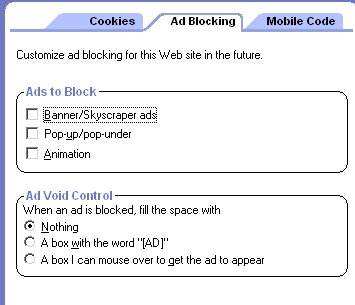
MusicWeb uses .inc (includes) files to deliver information into webpages. These can be interfered with by protective devices such as Zone Alarm and also Spy-ware and Ad-aware programmes may prevent you seeing these.As an example if you use Zone Alarm just ticking the following is not enough.
You need to select MusicWeb and hit the Options button (bottom right) and select Ad Blocking. Remove all the crosses from the boxes to allow pop-ups and banners. This will be specific for MusicWeb. You will need to repeat for any other trusted site.










Please support our advertisers below by clicking on the logos for further information.

All Lyrita reviews

All Nimbus reviews
All Hyperion reviews

All First Inversion reviews
(formerly Divine Art)

All Forgotten Records reviews

All cpo reviews
All Convivium reviews

All SOMM reviews

All APR reviews

All Chandos reviews

All Oehms Classics reviews

All Bridge reviews

All Orfeo reviews
|
Advertising on Musicweb |